
Category: Tutorials / WordPress Plugins
Reading Time: 4 Minutes
If you have ever built a course on MasterStudy LMS, you know the struggle. You have a great curriculum and hundreds of quiz questions ready to go in a spreadsheet, but getting them into WordPress is a nightmare.
Clicking “Add Question,” typing the question, adding the answers, selecting the correct choice, and hitting save… repeated 500 times. It’s tedious, prone to copy-paste errors, and a massive waste of time.
In this guide, I’m going to show you how to skip the manual work and bulk import hundreds of questions instantly using a simple CSV file.
The Problem: Manual Entry Kills Productivity
MasterStudy is a fantastic Learning Management System, but out of the box, it lacks a robust bulk import tool for quizzes. For instructors, agencies, and course creators, this is a major bottleneck.
Imagine migrating a course from another platform or digitizing a university exam. You likely have the data in Excel or Google Sheets. Re-entering it manually shouldn’t be part of the job description.
The Solution: Bulk Import Master Study Questions
To solve this, we developed the Bulk Import Questions for Master Study plugin. It is a lightweight, purpose-built add-on designed specifically to bridge this gap.
Key Features:
- CSV Support: Import from Excel or Google Sheets (saved as
.csv). - Bulk Processing: Upload dozens or hundreds of questions at once.
- Smart Mapping: Automatically detects Question Title, Question Type, Question Category, Question Image, Answer, Correct Answer and Explanation.
- Format Support: Handles Single Choice, Multiple Choice and True-False questions.
Step-by-Step Guide: Importing Your Questions
Here is how you can import your entire question bank in less than 5 minutes.
Step 1: Install the Plugin
First, you need the importer tool.
- Download Bulk Import Questions for Master Study
- Go to your WordPress Dashboard > Plugins > Add New.
- Upload the plugin file and click Activate.
Step 2: Prepare Your CSV File
The success of a bulk import depends on the data structure. You don’t need complex coding, just a clean spreadsheet.
- Open Excel or Google Sheets.
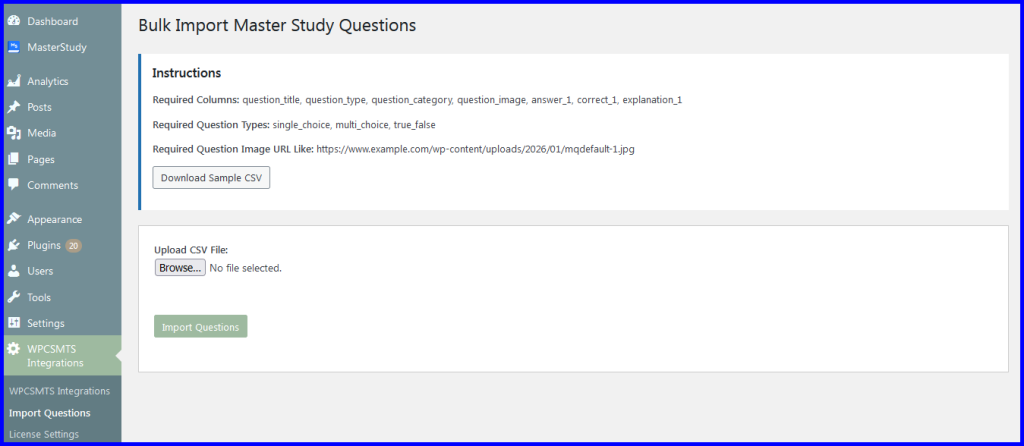
- Create the following columns (headers):
- question_title
- question_type
- question_category
- question_image
- answer_1
- correct_1
- explanation_1
- Pro Tip: We provide a Sample CSV Template inside the plugin settings. Download it to ensure your formatting is perfect.
- Save your file as CSV (Comma delimited).
Step 3: Upload and Import
- Navigate to WPCSMTS Integrations > Import Questions in your sidebar.
- Click “Choose File” and select your CSV.
- Click Import.
Step 4: Verify Your Questions
Once the progress bar hits 100%, head over to the MasterStudy> Questions library. You will see all your questions populated, complete with answer choices and correct markers, ready to be added to a quiz.
Why Use This Method?
- Speed: What used to take 3 days now takes 10 minutes.
- Accuracy: Eliminates human error involved in manual copy-pasting.
- Scalability: Perfect for large question banks, certification exams, and migrating from other LMS platforms.
Ready to Save Time?
Stop wasting hours on manual data entry. Get the Bulk Import Questions for Master Study plugin today and streamline your course creation workflow.
This is an excellent guide—thank you for taking the time to put this together. I’ve personally used this plugin to bulk import quiz questions into MasterStudy LMS using CSV files, and it has been a huge time-saver compared to manually entering questions one at a time.
The instructions are clear and easy to follow, and as long as the CSV file is formatted according to the specifications, the import process works smoothly. I also appreciate that the plugin is lightweight and does exactly what it’s designed to do without unnecessary complexity.
For anyone managing a large number of courses or quizzes, this is a very practical and efficient solution. Highly recommended for course creators who want to streamline their workflow.
Thanks a lot for the great feedback! 🙌
It really means a lot to us and motivates us to keep improving the plugin.